
搜索文档
知识点
定义
一个文件中包含 n 个组件。是一个 .html 文件
Vue 中使用组件的三大步骤
- 定义组件(创建组件)
- 注册组件
- 使用组件(写组件标签)
如何定义一个组件
- 使用 Vue.extend(options) 创建,其中 options 和 new Vue(options) 创建 Vue 实例时传入的 options 几乎一样,但也有点区别。
- 区别如下:
- el 不能写,原因是最终所有的组件都要经过一个 Vue 实例 vm 的管理,由 vm 中的 el 决定服务于哪个容器。
- data 必须写成函数,函数返回一个对象,所有的数据写在这个对象中。这样做的原因是避免组件被复用时,数据存在引用关系。
- 使用 template 可以配置组件结构。
如何注册组件
- 局部注册:在 new Vue 实例时,传入一个 components 选项。
- 全局注册:用过 Vue.component('组件名','组件') 注册。
使用组件
组件标签与其他 DOM 节点标签一样,也有开始标签和结束标签,标签名就是在注册组件时的组件名。
代码实现
局部注册
需求:创建一个学校组件,包含学校名称基地址,并将组件渲染到页面。
代码实现
html<body> <div id="root"> <school></school> </div> <script> const school = Vue.extend({ template: ` <div> <h3>学校名字:{{ name }}</h3> <h3>学校地址:{{ address }}</h3> </div> `, data(){ return { name: '内蒙古农业大学', address: '内蒙古呼和浩特' } } }); const vm = new Vue({ el: '#root', components: { school } }) </script> </body>运行结果

全局注册
需求:注册一个全局组件,在两个 Vue 实例所服务的容器内渲染该组件。
代码实现
html<body> <div id="root"> <school></school> </div> <script> const school = Vue.extend({ template: ` <div> <h3>学校名字:{{ name }}</h3> <h3>学校地址:{{ address }}</h3> </div> `, data(){ return { name: '内蒙古农业大学', address: '内蒙古呼和浩特' } } }); Vue.component('school', school); const vm = new Vue({ el: '#root', }) </script> </body>运行结果:同上
注意点
组件名
- 一个单词组成
- 第一种写法(首字母小写):student
- 第二种写法(首字母大写):Student
- 多个单词组成
- 第一种写法(kebab-case 命名):my-school
- 第二种写法(CamelCase 命名):MySchool(需要 Vue 脚手架支持)
- 备注
- 组件名尽可能回避 HTML 中已有的元素名称。例如:H2,h2 这都不可以。
- 在定义组件时可以使用 name 配置项指定组件在开发者工具中呈现的名字。
组件标签
第一种写法:
html<school></school>第二种写法
html<school />备注:不使用脚手架时,第二种写法会导致后续组件不能渲染。
一个简单写法
在创建组件时,之前的写法是这样的:
javascriptconst school = Vue.extend(option)这里可以省略 Vue.extend
javascriptconst school = option程序代码
html<body> <div id="root"> <school></school> </div> <script> const school = { template: ` <div> <h3>学校名字:{{ name }}</h3> <h3>学校地址:{{ address }}</h3> </div> `, data(){ return { name: '内蒙古农业大学', address: '内蒙古呼和浩特' } } }; const vm = new Vue({ el: '#root', components: { school } }) </script> </body>
组件嵌套
基本用法
- 在定义组件时,也可以加入 components 配置项,这样可以将一个组件嵌套在另一个组件中。
- 我们把嵌套组件的外层组件称为父组件,内层组件称为子组件。
- 值得注意的是,子组件要在父组件的上面定义,否则子组件不会被加载出来。
例题
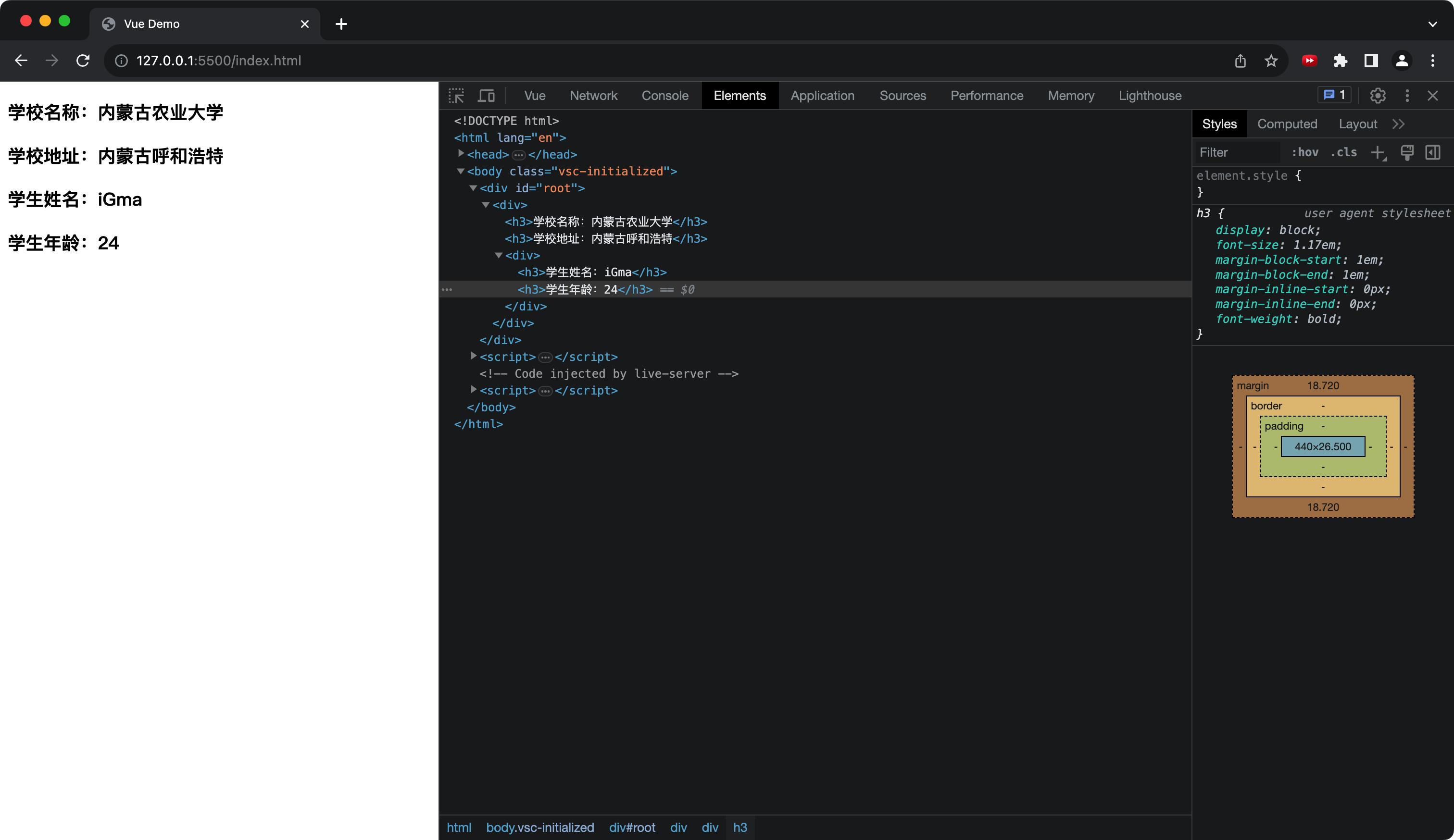
需求:定义一个子组件 student,一个父组件 school,将 student 组件嵌入到 school 组件中。
代码
html<body> <div id="root"> <school></school> </div> <script> // 定义学生组件 const student = Vue.extend({ template: ` <div> <h3>学生姓名:{{ name }}</h3> <h3>学生年龄:{{ age }}</h3> </div> `, data(){ return { name: 'iGma', age: 24 } } }) // 定义父组件 school const school = Vue.extend({ template: ` <div> <h3>学校名称:{{name}}</h3> <h3>学校地址:{{address}}</h3> <student></student> </div> `, data(){ return { name: '内蒙古农业大学', address: '内蒙古呼和浩特' } }, components: { student } }) // new Vue 实例,在 components 中引入父组件 new Vue({ el: '#root', components: { school } }) </script> </body>运行结果
VueComponent
组件本质
- 组件本质就是一个名为 VueComponent 的构造函数,且不是程序员定义的,是 Vue.extend 生成的。
- 我们只需要写组件标签,Vue 解析式会帮我们创建组件的实例对象。
- 特别注意:每次调用 Vue.extend 都会生成一个全新的 VueComponent。
关于 this 的指向
- 组件配置中:data 函数、methods 中的函数、watch 中的函数、computed 中的函数,他们的 this 均指向 VueComponent 实例对象。
- new Vue 实例时,data 函数、methods 中的函数、watch 中的函数、computed 中的函数,他们的 this 均指向 Vue 实例对象。
简称
- Vue 的实例对象简称为 vm
- VueComponent 的实例对象简称为 vc