
搜索文档
前言
时间 2025 年 10 月 10 日,本文小编带领大家基于 VitePress 搭建一套博客系统,在此之前小编曾使用 VuePress 作为博客框架搭建过一套系统,目前已停止维护。在一次翻阅 VuePress 文档时发现了 VitePress 框架,在好奇心的驱使下,小编利用下班空余时间鼓秋了一会儿,关于 VuePress 和 VitePress 两者的区别官网上是这样描述的:
VuePress 与 VitePress 的区别
VitePress 灵感来源于 VuePress。最初的 VuePress 1 基于 Vue 2 和 webpack。VitePress 则基于 Vue 3 和 Vite 开发,提供了更好的开发体验、更好的生产性能、更精美的默认主题和更灵活的自定义 API。
VitePress 和 VuePress 1 的 API 区别主要在于主题和自定义。如果你使用的是 VuePress 1 的默认主题,应该可以很方便地迁移到 VitePress。
并行维护两个 SSG 是难以持续的,因此 Vue 团队决定将 VitePress 作为长期维护并推荐的 SSG。现在 VuePress 1 已被弃用,VuePress 2 已移交给 VuePress 社区团队进行进一步开发和维护。
能刷到本篇文章想必各位对计算机这个行业或多或少都有一些了解,各个技术、框架更新迭代比较快,所以本文讲持续更新,分享一些好用的 VitePress 插件及官方配置。
准备工作
环境配置
| 环境 | 版本号 |
|---|---|
| 操作系统 | macOS Sequoia 15.7.1 |
| Node | v23.7.0 |
| npm | v10.9.2 |
| Git | v2.43.0 |
Node
最低版本要求:v18+。
Git
根据个人实际需求决定,非必要,小编建议创建一个 Blog 仓库存放我们的笔记。
项目中用到的包及版本
json
{
    "devDependencies": {
        "vitepress": "^2.0.0-alpha.12"
    },
    "scripts": {
        "docs:dev": "vitepress dev docs",
        "docs:build": "vitepress build docs",
        "docs:preview": "vitepress preview docs",
        "create:file": "node scripts/CreateFile"
    },
    "dependencies": {
        "@element-plus/icons-vue": "^2.3.2",
        "echarts": "^6.0.0",
        "element-plus": "^2.11.4"
    }
}create:file
这里的 create:file 是小编自己写的脚本,其余三个是 VitePress 自带的。
安装
前置工作
首先需要创建一个目录,如果你已经创建了 Git 仓库,直接 clone 即可。
在终端中进入该目录。
sh
npm add -D vitepress@nextsh
pnpm add -D vitepress@nextsh
yarn add -D vitepress@next vuesh
bun add -D vitepress@next安装向导
sh
npx vitepress initsh
pnpm vitepress initsh
yarn vitepress initsh
bun vitepress init运行后回答几个问题
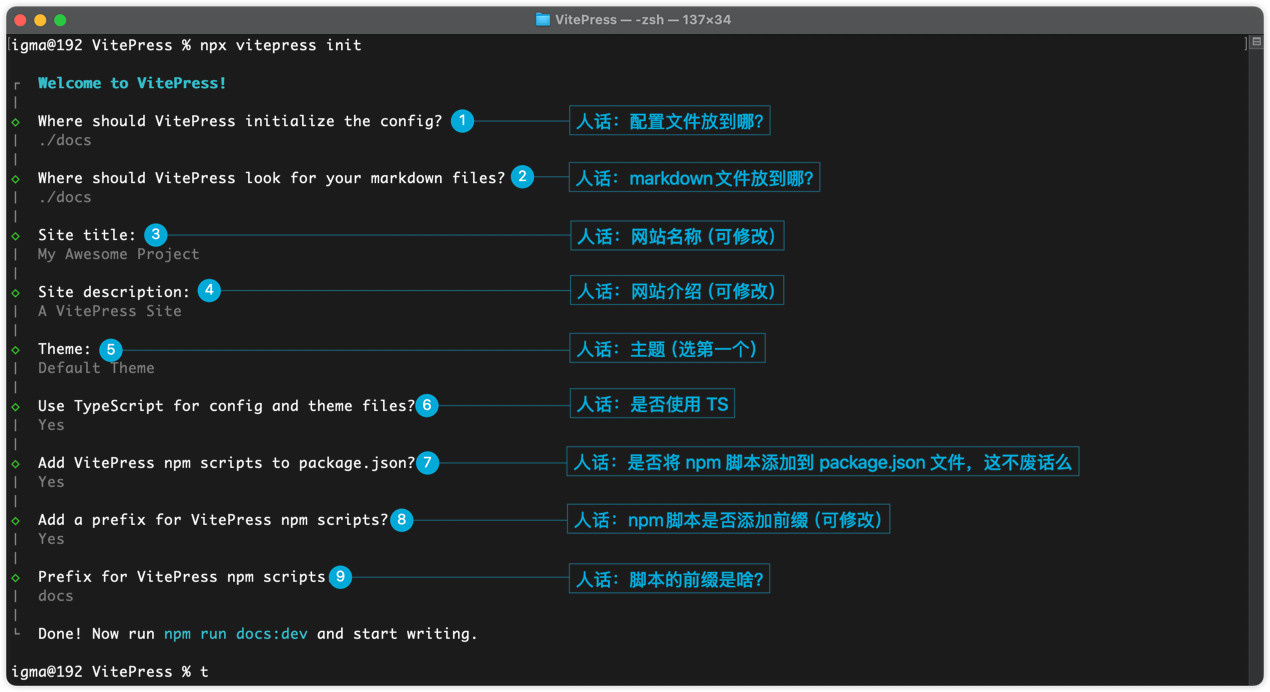
目录结构
.
├─ docs
│  ├─ .vitepress
│  │  └─ config.mts (配置文件,很重要,详情见下文)
│  ├─ api-examples.md (没啥用)
│  ├─ markdown-examples.md (没啥用)
│  └─ index.md (首页,有点重要,详情见下文)
└─ package.json创建子目录
在这小编推荐创建几个子目录
.
├─ docs
│  ├─ .vitepress
│  │  └─ theme (自定义主题目录)
│  │  └─ config.mts
│  ├─ public (静态资源目录)
│  ├─ Blog (技术博客目录)
│  ├─ utils (工具类)
│  └─ index.md
├─ scripts (自定义脚本目录)
└─ package.json这里的 public 目录里可以放一些项目的静态文件,比如 Logo、博客中的图片 等。public 目录中的文件在使用时可以直接以 / 开头,写绝对路径,例:在 .md 文件中展示图片
sh
启动项目
运行 npm 脚本
sh
npm run docs:devsh
pnpm run docs:devsh
yarn docs:devsh
bun run docs:dev如果不喜欢用命令行启动还可以用 WebStorm 打开项目,在 WebStorm 中配置启动脚本。
首页
在讲解首页配置前,小编先带领大家了解一下 frontmatter 和 VitePress 的 3 种布局。
关于 frontmatter
关于 frontmatter 小编建议大家去 官网 做个简单了解,在这里小编也汇总一些可能会用到的配置项、类型及说明。
核心通用配置
| 配置项 | 类型 | 说明 |
|---|---|---|
| layout | string | 指定页面布局(默认使用主题布局,可自定义布局组件) |
| title | string | 页面标题(会显示在浏览器标签、导航栏和 SEO 中),默认使用一级标题 # 的内容。 |
| head | array | 自定义页面头部标签(如额外的 <meta>、<link>、<script>) |
| navbar | boolean | 控制导航栏是否显示 |
| sidebar | boolean/string | 控制侧边栏是否显示:false 隐藏;'auto' 自动(默认);'hidden' 强制隐藏 |
| description | string | 页面描述(<meta name="description">) |
| pageClass | string | 给页面添加自定义 CSS 类名 |
路由相关
| 配置项 | 类型 | 说明 |
|---|---|---|
| sidebarDepth | number | 侧边栏自动生成时的标题层级深度 |
| prev | object/string | 上一篇文章链接 { text: '标题', link: '/path' } 或直接写链接 |
| next | object/string | 下一篇文章链接(格式同上) |
| editLink | boolean | 是否显示「编辑此页」链接(默认继承主题配置,false 可单独禁用) |
| lastUpdated | boolean | 是否显示「最后更新时间」(默认继承主题配置,false 可单独禁用) |
| permalink | String | 自定义页面路由路径(默认基于文件路径生成,如 docs/guide.md → /guide.html) |
SEO 与社交分享
| 配置项 | 类型 | 说明 |
|---|---|---|
| metaTitle | string | 覆盖 SEO 中的 <title> 标签(优先于 title) |
| meta | array | 自定义 <meta> 标签,如 [{ name: 'keywords', content: 'xxx' }] |
og:title/og:image 等 | string | Open Graph 协议标签,用于社交分享(如微信、Facebook 预览) |
| twitter:card | string | Twitter 卡片样式(如 summary_large_image) |
进阶功能配置
| 配置项 | 类型 | 说明 |
|---|---|---|
| lang | string | 页面语言(如 zh-CN、en-US,影响 HTML 的 lang 属性) |
| dir | string | 文本方向(ltr 左到右,rtl 右到左,默认 ltr) |
| isDark | boolean | 强制页面使用深色模式(true 启用,默认跟随全局设置) |
| toc | boolean | 是否生成目录(Table of Contents),默认根据主题配置 |
| contributors | array | 页面贡献者列表(需配合主题支持显示) |
页面布局
doc它将默认文档样式应用于 markdown 内容。home“主页”的特殊布局。可以添加额外的选项,例如 hero 和 features,以快速创建漂亮的落地页。page表现类似于 doc,但它不对内容应用任何样式。当想创建一个完全自定义的页面时很有用。
md
---
layout: doc
---区域划分
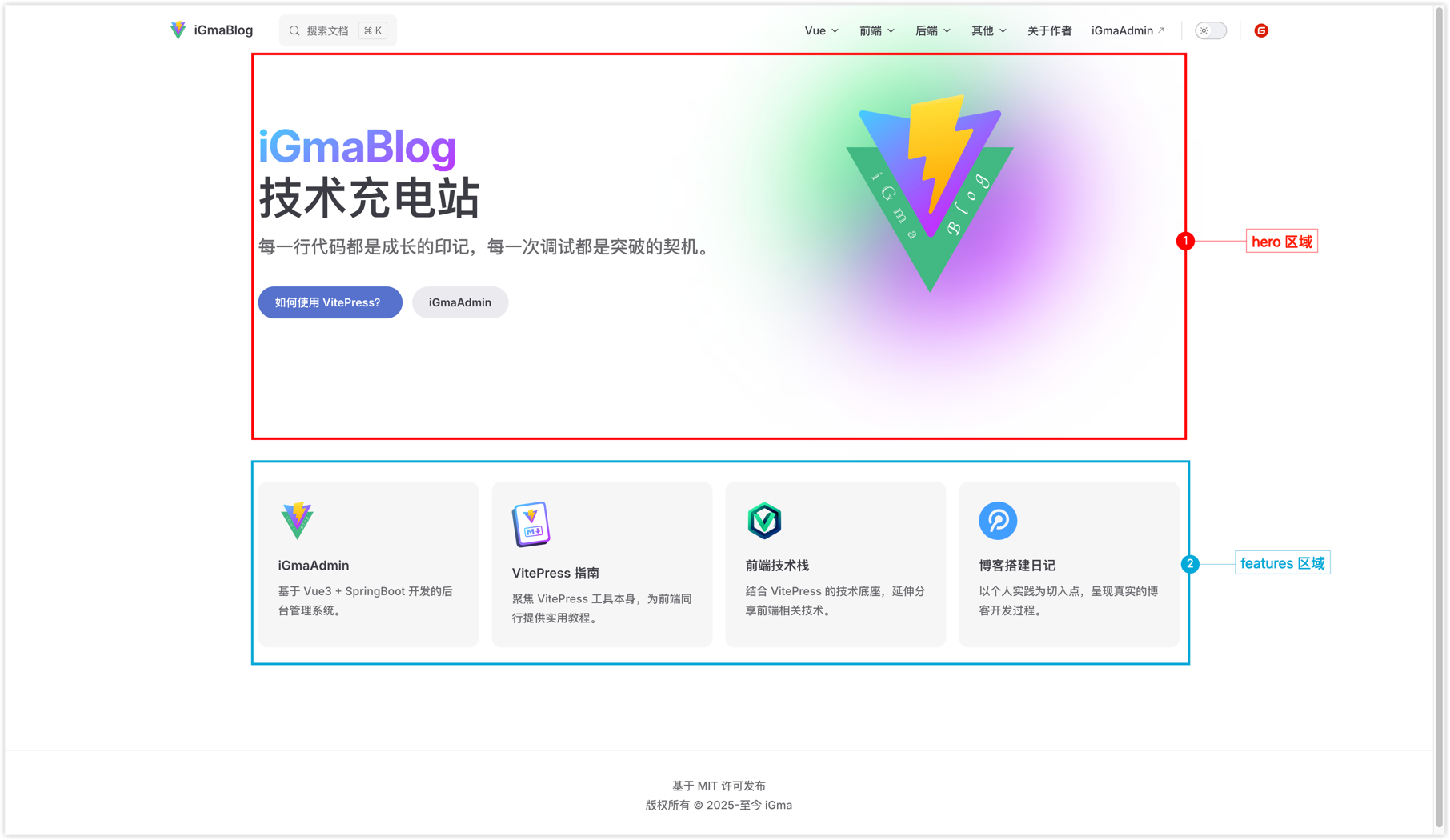
md
---
layout: home

hero:
  name: "iGmaBlog"
  text: "技术充电站"
  tagline: "每一行代码都是成长的印记,每一次调试都是突破的契机。"
  image:
    src: /logo.png
  actions:
    - theme: brand
      text: 如何使用 VitePress?
      link: /Blog/教程/article_db5a91eb
    - theme: alt
      text: iGmaAdmin
      link: https://www.igma.ink/

features:
  - icon:
      src: /logo.png
    title: iGmaAdmin
    details: 基于 Vue3 + SpringBoot 开发的后台管理系统。
    link: https://www.igma.ink/
  - icon:
      src: /vitepress-logo.svg
    title: VitePress 指南
    details: 聚焦 VitePress 工具本身,为前端同行提供实用教程。
    link: https://vitepress.dev
  - icon:
      src: /FrontEndLogo.png
    title: 前端技术栈
    details: 结合 VitePress 的技术底座,延伸分享前端相关技术。
    link: /Blog/Web/article_inagg4ir
  - icon:
      src: /BlogLogo.png
    title: 博客搭建日记
    details: 以个人实践为切入点,呈现真实的博客开发过程。
    link: /author#c2
---配置文件
一些简单的配置在这就不过多赘述了,大家可参考 官网 进行配置,下面小编将挑几个重要的或是官网上没有的唠唠。
隐藏后缀
- 配置项:
cleanUrls - 类型:
Boolean - 默认值:
false
当设置为 true 时,VitePress 将从 URL 中删除 .html 后缀,详情见 官方文档。
忽略死链
- 配置项:
ignoreDeadLinks - 类型:
Boolean - 默认值:
false
这个有点重要,小编曾踩过坑。当设置为 true 时,VitePress 不会因为死链而导致构建失败。详情见 官方文档。
头部配置
- 配置项:
head - 类型:
Array - 默认值:
[]
要在页面 HTML 的 <head> 标签中呈现的其他元素。
例:页签图标
ts
export default defineConfig({
    head: [
        ['link', {rel: 'icon', href: '/logo.png'}]
    ]
})例:引入 iconfont 项目
ts
export default defineConfig({
    head: [
        ['link', {
            rel: 'stylesheet',
            href: '//at.alicdn.com/t/c/xxxxxxxxxxxxxxxx.css'
        }],
    ]
})详情见 官方文档。
主题配置
- 配置项:
themeConfig - 类型:
Object
在主题配置中你可以设置网站 Logo、导航栏、侧边栏、搜索框等。详情见 官方文档。
导航栏
- 配置项:
themeConfig.nav - 类型:
Array
示例代码:
ts
export default defineConfig({
    themeConfig: {
        nav: [{
            text: 'Vue',
            activeMatch: '/Vue|Axios/',
            items: [
                {text: 'Vue3', link: '/Blog/Vue3/article_ar58jmcx', activeMatch: 'Vue3'},
                {text: 'Vue2', link: '/Blog/Vue2/article_srwlgtub', activeMatch: 'Vue2'},
                {text: 'Axios', link: '/Blog/Axios/article_x08lr65c', activeMatch: 'Axios'},
            ]
        }]
    }
})这里值得一提的是 activeMatch 配置,这个配置决定当前菜单在什么时候处于激活状态,上面代码的第 5 行可以理解为当路由中存在 Vue 或 Axions 时,本菜单高亮。
侧边栏
- 配置项:
themeConfig.sidebar - 类型:
Object
示例代码:
ts
export default defineConfig({
    themeConfig: {
        sidebar: {
            '/Blog/Vue3': [
                {link: '/Blog/Vue3/article_ar58jmcx', text: 'Vue3 开篇'},
                {link: '/Blog/Vue3/article_a83bx8f3', text: 'Vue3 常用的组合式API'},
            ]
        }
    }
})上面代码可以理解为当路由中包含 /Blog/Vue3 时显示两个侧边栏。当然,如果你的博客分类有很多,不想每个分类配置一次,也可以批量生成,小编在 docs/utils 目录中创建了一个工具类,可以根据你项目目录中的博客文件生成侧边栏,在本文末尾小编会附上本博客对应的部分代码。
搜索
- 配置项:
themeConfig.search - 类型:
Object
示例代码:
ts
export default defineConfig({
    themeConfig: {
        search: {
            provider: 'local',
            options: {
                translations: {
                    button: {
                        buttonText: '搜索文档',
                        buttonAriaLabel: '搜索文档'
                    },
                    modal: {
                        noResultsText: '无法找到相关结果',
                        resetButtonTitle: '清除查询条件',
                        footer: {
                            selectText: '选择',
                            navigateText: '切换',
                            closeText: '关闭'
                        }
                    }
                }
            }
        }
    }
})自带的本地搜索不太好用,原计划小编准备使用 Algolia Search,奈何 Algolia Search 还是有一定门槛的,虽然门槛不高,但是对于一些没有域名的朋友不是很友好。
爹有娘有不如自己有,查阅了一些资料发现 VitePress 是可以自定义搜索组件的,这就很 nice,于是小编消耗了几个小时的时间,手戳了一个搜索组件,虽然功能不是很强大,但对于小编的日常使用足以。 目前组件支持搜索文章和搜索目录两大块,对于内容的搜索目前还在考虑,搜索内容好处理,难点是无法准确的跳转到目标位置,待小编完善组件后会更新本文档。 在开始前请各位先阅读下方的 自定义主题。下面是小编手戳组件的实现步骤:
移除 themeConfig.search 配置
删除 config.mts 文件中的 themeConfig.search 配置,这步虽简单,但是是必要的,如果不删除该配置,自定义搜索组件将无效。
安装 mitt
mitt 是组件通信的一种方式,这里小编借助它定义了全局的键盘事件,方便后续使用,详情见 组件通信。
sh
npm i mitt创建工具类
接下来所有的操作均在 /docs/.vitepress/theme 目录下。
在 /docs/.vitepress/theme/utils 目录下创建 3 个工具类,具体作用如下:
emitter.js:配合mitt使用。posts.data.js:此文件借助VitePress为我们提供的 createContentLoader 来获取所有博客文件。tool.js:这里是小编自己封装了几个方法,其中包括防抖函数、消息确认框以及格式化日期的方法。
js
import mitt from "mitt";

export default mitt();js
async function loadPosts() {
    const {createContentLoader} = await import('vitepress');

    const extractMarkdownTitles = (markdownText) => {
        const titleRegex = /^(#{1,6})\s+(.+)$/gm;
        const titles = [];
        let match;

        while ((match = titleRegex.exec(markdownText)) !== null) {
            const text = match[2].trim();  // 标题文本
            titles.push(text);
        }

        return titles;
    }

    return createContentLoader('Blog/**/*.md', {
        includeSrc: true,
        transform(data) {
            for (let item of data) {
                item.menu = extractMarkdownTitles(item.src);
                let urlArr = item.url.split('/');
                urlArr.pop();
                urlArr.push(item.frontmatter.permalink.split('/').filter(e => e).join('_'));
                item.url = urlArr.join('/');
            }
        },
    })
}

export default loadPosts();js
import {ElMessageBox} from "element-plus";

let timer = null;

/**
 * 防抖函数
 * @param func 方法
 * @param delay 延迟时间
 */
export function debounce(func, delay = 500) {
    (function (...args) {
        if (timer) clearTimeout(timer);
        timer = setTimeout(() => {
            func.apply(this, args);
        }, delay);
    })()
}

/**
 * 消息确认框
 * @param {*} title 标题
 * @param {*} content 内容
 * @param {*} type 类型
 * @param {*} showCancelButton 是否显示取消按钮
 * @param {*} conBtn 确定按钮文案
 * @param {*} canBtn 取消按钮文案
 */
export function ELModel({title, content, type, showCancelButton, conBtn, canBtn}) {
    return new Promise((t, f) => {
        ElMessageBox.confirm(content, title || '提示', {
            confirmButtonText: conBtn || '确定',
            cancelButtonText: canBtn || '取消',
            showCancelButton: typeof showCancelButton === 'boolean' ? showCancelButton : true,
            type: type || 'warning',
        }).then(
            () => {t(true)},
            () => {t(false)}
        );
    })
}

/**
 * 日期格式化
 * @param time 时间
 * @param format 格式
 * @returns {string|null}
 */
export function parseTime(time = Date.now(), format = '{y}-{m}-{d} {h}:{i}:{s}') {
    let date
    if (typeof time === 'object') {
        date = time
    } else {
        if ((typeof time === 'string') && (/^[0-9]+$/.test(time))) {
            time = parseInt(time)
        } else if (typeof time === 'string') {
            time = time.replace(new RegExp(/-/gm), '/').replace('T', ' ').replace(new RegExp(/\.[\d]{3}/gm),'');
        }
        if ((typeof time === 'number') && (time.toString().length === 10)) {
            time = time * 1000
        }
        date = new Date(time)
    }
    const formatObj = {
        y: date.getFullYear(),
        m: date.getMonth() + 1,
        d: date.getDate(),
        h: date.getHours(),
        i: date.getMinutes(),
        s: date.getSeconds(),
        a: date.getDay()
    }
    return format.replace(/{(y|m|d|h|i|s|a)+}/g, (result, key) => {
        let value = formatObj[key]
        if (key === 'a') {
            return ['日', '一', '二', '三', '四', '五', '六'][value]
        }
        if (result.length > 0 && value < 10) {
            value = '0' + value
        }
        return value || 0
    })
}创建组件
在 /docs/.vitepress/theme/components 目录下创建 Search.vue 文件,当然,各位大佬肯定有更好的设计方案,不强制使用小编的代码,具体代码如下:
vue
<script setup>
import {data} from '../utils/posts.data.js'
import {reactive, ref, nextTick, watch, onUnmounted} from "vue";
import {debounce, ELModel, parseTime} from "../utils/tool";
import emitter from "../utils/emitter";
import {useRouter} from "vitepress";

let inputRef = ref();
let router = useRouter()
let dialog = reactive({
    show: false,
    nullSwitch: false,
    history: [],
    keyword: '',
    titleRes: [],
    menuRes: [],
    async open() {
        let list = localStorage.getItem('searchHistory');
        this.history = list ? JSON.parse(list) : [];
        this.show = true;
        await nextTick()
        inputRef.value.focus();
    },
    close() {
        this.show = false;
    },
    search(key) {
        this.nullSwitch = false;
        if (key) this.keyword = key;
        debounce(() => {
            if (this.keyword) {
                this.titleRes = [];
                this.menuRes = [];
                for (let item of data) {
                    if (item.frontmatter.title.includes(this.keyword)) {
                        this.titleRes.push({
                            title: this.replaceKeyword(item.frontmatter.title),
                            url: item.url,
                            historyTitle: item.frontmatter.title
                        })
                    }
                    this.menuRes.push(...item.menu.filter(e => e.includes(this.keyword)).map(e => ({
                        title: this.replaceKeyword(e),
                        historyTitle: e,
                        url: `${item.url}#${e.trim().replace(/\s+/g, '-').toLowerCase()}`,
                        docTitle: item.frontmatter.title
                    })))
                }
            }
            this.nullSwitch = true;
        })
    },
    replaceKeyword(text) {
        return text.replace(this.keyword, `<span class="keyword">${this.keyword}</span>`)
    },
    closeHistoryTag(item) {
        this.history = this.history.filter(e => e.url !== item.url);
    },
    clearHistory() {
        ELModel({content: '正在清空搜索历史,是否继续?'}).then(e => {
            if (e) this.history = [];
        })
    },
});

watch(() => dialog.history, e => {
    localStorage.setItem('searchHistory', JSON.stringify(e));
}, {deep: true})

// 跳转页面
function goto(item, type) {
    let index;
    item.time = parseTime();
    if (type) {
        item.type = type;
        index = dialog.history.findIndex(e => e.url === item.url);
        if (index === -1) dialog.history.unshift(item);
    } else index = dialog.history.findIndex(e => e.url === item.url);

    if (index > 0) {
        dialog.history.splice(index, 1);
        dialog.history.unshift(item);
    }
    dialog.close();
    router.go(item.url);
}

emitter.on('keydown', e => {
    if (e.key === 'k' && (e.metaKey || e.ctrlKey)) dialog.open();
    if (e.key === 'Escape') dialog.close();
});

onUnmounted(() => {
    emitter.off('keydown');
});
</script>

<template>
    <div class="flex search">
        <div class="flex box" @click="dialog.open()">
            <el-icon><Search /></el-icon>
            <p>搜索文档</p>
            <el-button size="small">cmd + K</el-button>
        </div>
    </div>

    <div class="flex dialog DocSearch DocSearch-Container" v-if="dialog.show" @click.self="dialog.close()">
        <div class="body">
            <div class="flex header">
                <el-icon><Search /></el-icon>
                <input ref="inputRef" class="wh" v-model="dialog.keyword" placeholder="搜索文档" @input="dialog.search()" />
                <div class="flex clear">
                    <span v-if="dialog.keyword" @click="dialog.keyword = ''">清空输入框</span>
                    <el-icon @click="dialog.close()"><Close /></el-icon>
                </div>
            </div>
            <el-scrollbar height="50vh">
                <template v-if="dialog.keyword">
                    <template v-if="dialog.titleRes.length + dialog.menuRes.length">
                        <div class="res" v-if="dialog.titleRes.length">
                            <h3>文章</h3>
                            <div class="flex item" v-for="item in dialog.titleRes" :key="item.url" @click="goto(item, '文章')">
                                <i class="iconfont icon-time icon" />
                                <p v-html="item.title" />
                            </div>
                        </div>
                        <div class="res" v-if="dialog.menuRes.length">
                            <h3>目录</h3>
                            <div class="flex item" v-for="item in dialog.menuRes" :key="item.url" @click="goto(item, '目录')">
                                <i class="iconfont icon-time icon" />
                                <div>
                                    <p v-html="item.title" />
                                    <p class="from">来自:{{item.docTitle}}</p>
                                </div>
                            </div>
                        </div>
                    </template>
                    <template v-else-if="dialog.nullSwitch">
                        <el-empty description="暂无数据" />
                    </template>
                </template>
                <template v-else>
                    <div class="res">
                        <div class="flex history_title">
                            <h3>搜索历史</h3>
                            <el-icon @click="dialog.clearHistory()" v-if="dialog.history.length"><Delete /></el-icon>
                        </div>
                        <template v-if="dialog.history.length">
                            <div class="flex item" v-for="item in dialog.history" :key="item.url" @click="goto(item)">
                                <i class="iconfont icon-time icon" />
                                <div>
                                    <p>{{item.historyTitle}} <el-tag size="small">{{item.type}}</el-tag></p>
                                    <div class="flex from">
                                        <p>时间:{{item.time}}</p>
                                        <p v-if="item.docTitle">来自:{{item.docTitle}}</p>
                                    </div>
                                </div>
                                <el-icon class="remove_history" @click.stop="dialog.closeHistoryTag(item)"><Close /></el-icon>
                            </div>
                        </template>
                        <el-empty v-else description="暂无搜索历史数据" />
                    </div>
                </template>
            </el-scrollbar>
        </div>
    </div>
</template>

<style scoped>
.search {
    height: 100%;
    margin-left: 32px;

    .box {
        width: 100%;
        height: 40px;
        background: var(--vp-c-bg-alt);
        border-radius: 4px;
        padding: 0 12px;
        box-sizing: border-box;
    }
}

.dialog {
    .body {
        width: 800px;
        border-radius: 8px;
        background: var(--vp-c-bg-soft);

        .header {
            height: 60px;
            padding: 0 20px;
            border-bottom: 1px solid var(--vp-c-divider);
            box-sizing: border-box;

            .clear {
                margin-left: auto;
            }
        }

        .el-scrollbar {
            padding: 20px;
            box-sizing: border-box;
        }

        :deep(.el-scrollbar__view) {
            height: 100%;
            display: flex;
            flex-direction: column;
            gap: 20px;

            .el-empty {
                height: 100%;
            }
        }

        .res {
            h3 {
                font-weight: bold;
                margin-bottom: 10px;
            }

            .item {
                justify-content: start;
                background: var(--docsearch-hit-background);;
                margin-bottom: 4px;
                border-radius: 4px;
                padding: 10px 10px;
                box-sizing: border-box;

                .icon {
                    color: var(--el-color-primary);
                    font-size: 20px;
                }

                :deep(.keyword) {
                    color: red;
                }

                .from {
                    font-size: 12px;
                    color: var(--docsearch-secondary-text-color);
                    justify-content: start;
                    gap: 20px;
                }
            }

            .item:hover {
                background: var(--docsearch-hit-highlight-color);
            }

            .history_title {
                justify-content: space-between;
            }

            .remove_history {
                margin-left: auto;
            }
        }
    }
}
</style>配置自定义主题入口文件
修改 /docs/.vitepress/theme/index.js 文件,具体代码如下:
js
import DefaultTheme from 'vitepress/theme';
import ElementPlus from 'element-plus'
import 'element-plus/dist/index.css'
import 'element-plus/theme-chalk/dark/css-vars.css'
import * as ElementPlusIconsVue from '@element-plus/icons-vue'
import './style.css';
import iGmaPages from "./components/iGmaPages.vue";
import Search from "./components/Search.vue";
import CodeTitle from "./components/markdown/CodeTitle.vue";
import Dialect from "./components/markdown/Dialect.vue";
import {h} from "vue";
import emitter from "./utils/emitter";

export default {
    extends: DefaultTheme,
    enhanceApp({ app }) {
        app.component('iGmaPages', iGmaPages);
        app.component('CodeTitle', CodeTitle);
        app.component('Dialect', Dialect);
        app.use(ElementPlus);
        for (const [key, component] of Object.entries(ElementPlusIconsVue)) {
            app.component(key, component);
        }
        if (typeof window !== 'undefined') window.addEventListener('keydown', e => emitter.emit('keydown', e));
    },
    Layout() {
        return h(DefaultTheme.Layout, null, {
            'nav-bar-content-before': () => h(Search)
        })
    }
}文章目录配置
- 配置项:
themeConfig.outline - 类型:
Object
示例代码:
ts
export default defineConfig({
    themeConfig: {
        outline: {
            level: [1, 6],
            label: '目录'
        }
    }
})此配置在预览文章时生效,outline.label 是指目录栏展示的标题级别,最小值 1,最大值 6,对应 <h1> 至 <h6>。
路由重写
- 配置项:
rewrites - 类型:
Object
示例代码:
ts
export default defineConfig({
    rewrites: {
        'Blog/Vue3/01-Vue3开篇.md': 'Blog/Vue3/article_ar58jmcx.md',
    }
})这个有必要说明一下,纯属小编的个人习惯,不喜欢地址栏有中文,现在做的也不完美,后期完善了会提供这块完整的代码。
配置路由重写后会出现一个问题,当你把打包后的文件部署到服务器时首次预览谋篇文章时可以正常显示,但刷新页面后只能看到侧边栏,博客内容和目录均无法加载,这时因为没有配置 Nginx 刷新规则:
nginx
server {
    location / {
        try_files $uri $uri/ $uri.html /index.html;
    }
}自定义 Vite 配置
- 配置项:
vite - 类型:
Object - 说明:将原始
Vite配置传递给内部Vite开发服务器 /bundler
在小编的博客中,关于作者-博客预览图 中使用 ECharts 渲染图表,由于关于作者页是自定义页面,无法拿到博客数据,所有小编将博客数据放到了 vite 配置中,具体代码如下:
ts
export default defineConfig({
    vite: {
        plugins: [{
            name: 'node-to-client',
            configResolved(config) {
                config.define.__BLOG__ = countBlog();
            }
        }]
    },
})这里的 countBlog 方法在 doc/utils 工具类中,用于统计 ECharts 数据。
自定义 mackdown 配置
- 配置项:
markdown - 类型:
Object - 说明:小编在这配置了代码块是否显示行号以及图片预览功能。
默认情况下博客中的图片是无法点击预览大图的,这里小编使用的 markdown-it-custom-attrs 包,具体用法如下:
- 安装
sh
npm i markdown-it-custom-attrs- 引入与使用(config.mts)
ts
import {defineConfig} from 'vitepress'
import mdItCustomAttrs  from 'markdown-it-custom-attrs'

export default defineConfig({
    // 在 head 中引入灯箱 JS 和 CSS 文件
    head: [
        [
            "link",
            {rel: "stylesheet", href: "https://cdn.jsdelivr.net/npm/@fancyapps/ui/dist/fancybox.css"},
        ],
        ["script", {src: "https://cdn.jsdelivr.net/npm/@fancyapps/ui@4.0/dist/fancybox.umd.js"}],
    ],

    // 自定义 markdown
    markdown: {
        lineNumbers: true,  // 显示代码块行号
        config: (md) => {
            md.use(mdItCustomAttrs, 'image', {'data-fancybox': "gallery"})
        }
    }
})自定义主题
上文 安装-创建子目录 中小编建议各位创建 docs/.vitepress/theme 目录,这个目录用于配置自定义主题的,下面是小编博客的自定义主题目录结构:
theme
├── assets (静态资源目录)
├── components (自定义组件)
├── pages (自定义页面)
├── index.js (入口文件)
└── style.css (全局样式文件)想必学过 Vue 的同学对于这个目录并不陌生,没错,平时怎么写 Vue3,在这个目录里就怎么写,index.js 除外,大差不差。
js
import DefaultTheme from 'vitepress/theme';
import ElementPlus from 'element-plus'
import 'element-plus/dist/index.css'
import 'element-plus/theme-chalk/dark/css-vars.css'
import * as ElementPlusIconsVue from '@element-plus/icons-vue'
import './style.css';
import iGmaPages from "./components/iGmaPages.vue";

export default {
    extends: DefaultTheme,
    enhanceApp({ app }) {
        app.component('iGmaPages', iGmaPages);
        app.use(ElementPlus);
        for (const [key, component] of Object.entries(ElementPlusIconsVue)) {
            app.component(key, component);
        }
    }
}自定义脚本
在上文 准备工作-项目中用到的包及版本 中小编提到了 create:file 脚本。
为什么要写这个脚本呢?原因是这样的,在此之前小编的博客是基于 VuePress 搭建的,VuePress 项目在创建 .md 文件时会自动配置 frontmatter 的 permalink,但是在 VitePress 中没有这个功能,本博客侧边栏配置及路由重写均用到了 permalink,为此小编基于 Node 写了一个创建文件的脚本,具体代码见下文。
本博客的部分文件
配置文件
ts
import {defineConfig} from 'vitepress'
import mdItCustomAttrs  from 'markdown-it-custom-attrs'
import {buildSidebar, buildRewrites, countBlog} from '../utils/tool';

export default defineConfig({
    // 标题
    title: "iGmaBlog",

    // 简介
    description: "This is iGma's blog. Bloggers regularly share some technical articles.",

    // 主题配置
    themeConfig: {
        logo: '/logo.png',

        // 顶部导航栏
        nav: [{
            text: 'Vue',
            activeMatch: '/Vue|Axios/',
            items: [
                {text: 'Vue3', link: '/Blog/Vue3/article_ar58jmcx', activeMatch: 'Vue3'},
                {text: 'Vue2', link: '/Blog/Vue2/article_srwlgtub', activeMatch: 'Vue2'},
                {text: 'Axios', link: '/Blog/Axios/article_x08lr65c', activeMatch: 'Axios'},
            ]
        }, {
            text: '前端',
            activeMatch: '/Web|ES6|Less|TypeScript/',
            items: [
                {text: 'Web', link: '/Blog/Web/article_inagg4ir', activeMatch: 'Web'},
                {text: 'ES6', link: '/Blog/ES6/article_o36rpepb', activeMatch: 'ES6'},
                {text: 'Less', link: '/Blog/Less/article_3of4a2ba', activeMatch: 'Less'},
                {text: 'TypeScript', link: '/Blog/TypeScript/article_tvb8ei07', activeMatch: 'TypeScript'},
            ]
        }, {
            text: '后端',
            activeMatch: '/Java|C|MySQL|Node|Python/',
            items: [
                {text: 'Java', link: '/Blog/Java/article_786pc68b', activeMatch: 'Java'},
                {text: 'C语言', link: '/Blog/C/article_wzlcfz80', activeMatch: 'C'},
                {text: 'MySQL', link: '/Blog/MySQL/article_6q92x2tg', activeMatch: 'MySQL'},
                {text: 'Node', link: '/Blog/Node/article_oq6y2wgt', activeMatch: 'Node'},
                {text: 'Python', link: '/Blog/Python/article_kxp62do6', activeMatch: 'Python'},
            ]
        }, {
            text: '其他',
            activeMatch: '/Git|Linux|Mac|单片机|数字电路|数据结构|汇编语言|软件工程|软件测试/',
            items: [
                {text: 'Git', link: '/Blog/Git/article_1d9fijy6', activeMatch: 'Git'},
                {text: 'Linux', link: '/Blog/Linux/article_h0t0f54g', activeMatch: 'Linux'},
                {text: 'Mac', link: '/Blog/Mac/article_pi798wc2', activeMatch: 'Mac'},
                {text: '单片机', link: '/Blog/单片机/article_qhuguiok', activeMatch: '单片机'},
                {text: '数字电路', link: '/Blog/数字电路/article_ws9ukyqb', activeMatch: '数字电路'},
                {text: '数据结构', link: '/Blog/数据结构/article_anuyu8p0', activeMatch: '数据结构'},
                {text: '汇编语言', link: '/Blog/汇编语言/article_2i75kvh9', activeMatch: '汇编语言'},
                {text: '软件工程', link: '/Blog/软件工程/article_3htwnzi7', activeMatch: '软件工程'},
                {text: '软件测试', link: '/Blog/软件测试/article_yx9xtxdg', activeMatch: '软件测试'},
            ]
        }, {
            text: '关于作者',
            link: '/author'
        }, {
            text: 'iGmaAdmin',
            link: 'https://www.igma.ink'
        }],

        // 侧边栏
        sidebar: buildSidebar(),

        // 页脚配置
        footer: {
            message: '基于 MIT 许可发布',
            copyright: '版权所有 © 2025-至今 iGma'
        },

        // 搜索
        search: {
            provider: 'local',
            options: {
                translations: {
                    button: {
                        buttonText: '搜索文档',
                        buttonAriaLabel: '搜索文档'
                    },
                    modal: {
                        noResultsText: '无法找到相关结果',
                        resetButtonTitle: '清除查询条件',
                        footer: {
                            selectText: '选择',
                            navigateText: '切换',
                            closeText: '关闭'
                        }
                    }
                }
            }
        },

        // 社交帐户
        socialLinks: [{
            icon: {
                svg: '<svg t="1760198351971" class="icon" viewBox="0 0 1024 1024" version="1.1" xmlns="http://www.w3.org/2000/svg" p-id="5135" width="200" height="200"><path d="M512 960c-246.4 0-448-201.6-448-448s201.6-448 448-448 448 201.6 448 448-201.6 448-448 448z" fill="#D81E06" p-id="5136"></path><path d="M721.664 467.968h-235.52a22.272 22.272 0 0 0-20.736 20.736v51.776c0 10.368 10.368 20.736 20.736 20.736H628.48c10.368 0 20.736 10.304 20.736 20.672v10.368c0 33.664-28.48 62.08-62.144 62.08H392.896a22.272 22.272 0 0 1-20.672-20.672V436.928c0-33.664 28.48-62.08 62.08-62.08h287.36a22.272 22.272 0 0 0 20.736-20.736v-51.84a22.272 22.272 0 0 0-20.736-20.672h-287.36A152.96 152.96 0 0 0 281.6 434.368v287.36c0 10.304 10.368 20.672 20.736 20.672h302.848c75.072 0 137.216-62.08 137.216-137.216v-116.48a22.272 22.272 0 0 0-20.736-20.736z" fill="#FFFFFF" p-id="5137"></path></svg>'
            },
            link: 'https://gitee.com/iGma_e'
        }],

        // 目录配置
        outline: {
            level: [1, 6],
            label: '目录'
        }
    },

    // 简洁 URL(是否隐藏文件扩展名)
    cleanUrls: true,

    // 头部配置
    head: [
        ['link', {rel: 'icon', href: '/logo.png'}],
        ['link', {
            rel: 'stylesheet',
            href: '//at.alicdn.com/t/c/font_5043612_dleox56xjf.css'
        }],
        [
            "link",
            {rel: "stylesheet", href: "https://cdn.jsdelivr.net/npm/@fancyapps/ui/dist/fancybox.css"},
        ],
        ["script", {src: "https://cdn.jsdelivr.net/npm/@fancyapps/ui@4.0/dist/fancybox.umd.js"}],
    ],

    // 是否过滤无效链接
    ignoreDeadLinks: true,

    // 路由重写
    rewrites: buildRewrites(),

    // Vite 配置
    vite: {
        plugins: [{
            name: 'node-to-client',
            configResolved(config) {
                config.define.__BLOG__ = countBlog();
            }
        }]
    },

    // markdown 配置
    markdown: {
        lineNumbers: true,  // 显示代码块行号
        config: (md) => {
            md.use(mdItCustomAttrs, 'image', {'data-fancybox': "gallery"})
        }
    }
})工具类
js
import path from "node:path";
import fs from "node:fs";

// 根目录
const DIR_PATH = path.resolve();

// 构建侧边栏
export function buildSidebar() {
    let res = {};
    let dirs = fs.readdirSync(path.join(DIR_PATH, '/docs/Blog'));
    for (let item of dirs) {
        let list = [];
        let key = `/Blog/${item}`;
        let files = fs.readdirSync(path.join(DIR_PATH, `/docs${key}`)).filter(file => path.extname(file).toLowerCase() === '.md');
        for (let name of files) {
            let readRes = fs.readFileSync(path.join(DIR_PATH, `/docs/${key}/${name}`)).toString().split('\n');
            let title = [], permalink = [];
            readRes.forEach(e => {
                if (e.includes('title')) title.push(e);
                if (e.includes('permalink')) permalink.push(e);
            })
            let link = key + `/${permalink[0].split(': ')[1].split('/').filter(e => e).join('_')}`;
            let text = title[0].split(': ')[1];
            list.push({link, text})
        }
        res[key] = list;
    }
    return res;
}

// 构建路由重写
export function buildRewrites() {
    let res = {};
    let dirs = fs.readdirSync(path.join(DIR_PATH, '/docs/Blog'));
    for (let item of dirs) {
        let files = fs.readdirSync(path.join(DIR_PATH, `/docs/Blog/${item}`)).filter(file => path.extname(file).toLowerCase() === '.md');
        for (let name of files) {
            let permalink = fs.readFileSync(path.join(DIR_PATH, `/docs/Blog/${item}/${name}`)).toString().split('\n').filter(e => e.includes('permalink'));
            res[`Blog/${item}/${name}`] = `Blog/${item}/` + permalink[0].split(': ')[1].split('/').filter(e => e).join('_') + '.md';
        }
    }
    return {...res};
}

// 统计博客数量
export function countBlog() {
    let sort = fs.readdirSync(path.join(DIR_PATH, '/docs/Blog'));
    let count = 0;
    let sortCount = {};
    for (let item of sort) {
        let key = `/Blog/${item}`;
        let files = fs.readdirSync(path.join(DIR_PATH, `/docs${key}`)).filter(file => path.extname(file).toLowerCase() === '.md');
        count += files.length;
        sortCount[item] = files.length;
    }

    return {sort, count, sortCount};
}脚本文件
js
import readline from 'node:readline';
import crypto from 'node:crypto';
import fs from "node:fs";

const rl = readline.createInterface({
    input: process.stdin,
    output: process.stdout,
});

const question = (prompt) => {
    return new Promise((resolve) => {
        rl.question(prompt, (answer) => {
            resolve(answer);
        });
    });
};

const generateUniqueId = () => crypto.randomBytes(16).toString('hex', 0, 4);

const init = async () => {
    const dir = await question('请输入目录:');
    const file = await question('请输入文件名:');
    let count = String(fs.readdirSync(dir).length + 1);
    let title = count.padStart(2, '0') + `-${file}.md`

    fs.writeFile(`${dir}/${title}`, `---\ntitle: ${file}\npermalink: /article/${generateUniqueId()}/\n---`, e => {
        if (e) {
            console.log('服务异常:', e);
            return;
        }
        console.log('文件创建成功');
    })
    rl.close();
};

init();